In short
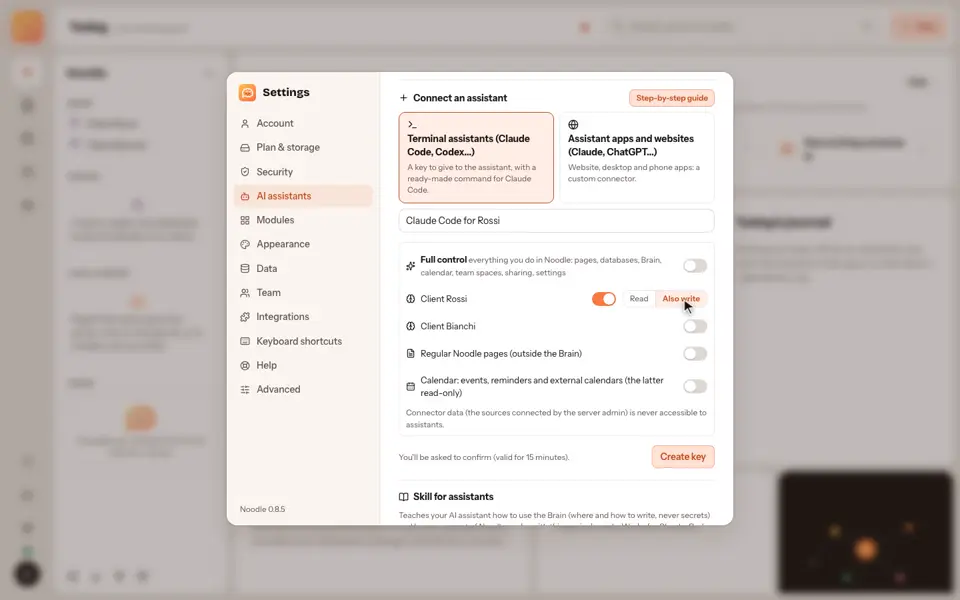
To use Noodle from Claude or ChatGPT, you add it as a custom connector and choose what the assistant may see.
Step by step
- In your assistant's connector settings, paste the Noodle connector address.
- The assistant opens Noodle's consent page, with a pairing code.
- Click Sign in to Noodle and approve and check that the code matches.
- Choose what the assistant may see and approve.
- Confirm with your second factor.
Good to know
- The assistant only sees what you granted.
- The remote connector is part of Noodle Cloud, which is by invitation for now.
- The choices include Full control, which goes well beyond single vaults: read the guide on AI assistants before turning it on.
Video transcript
To use Noodle from Claude or ChatGPT, add it as a custom connector. In your assistant's connector settings, paste this address. The assistant opens Noodle's consent page, with a pairing code. Click sign in to Noodle and approve, and check that the pairing code matches. Choose what the assistant may see, approve, and confirm with your second factor. The assistant carries on by itself, and it only sees what you granted. Noodle. You decide what each assistant can see.